Review
Paste App Review for Mac (2026): Good Design, Real Limitations
Paste is the most visually polished clipboard manager on macOS. It's also a subscription, syncs through iCloud, and becomes hard to use for anything older than a few hours. Here's the full picture.
Written by the Pastery team. We make a competing product — take our conclusions with that in mind — but we've tried to represent Paste's features accurately.
What Paste is
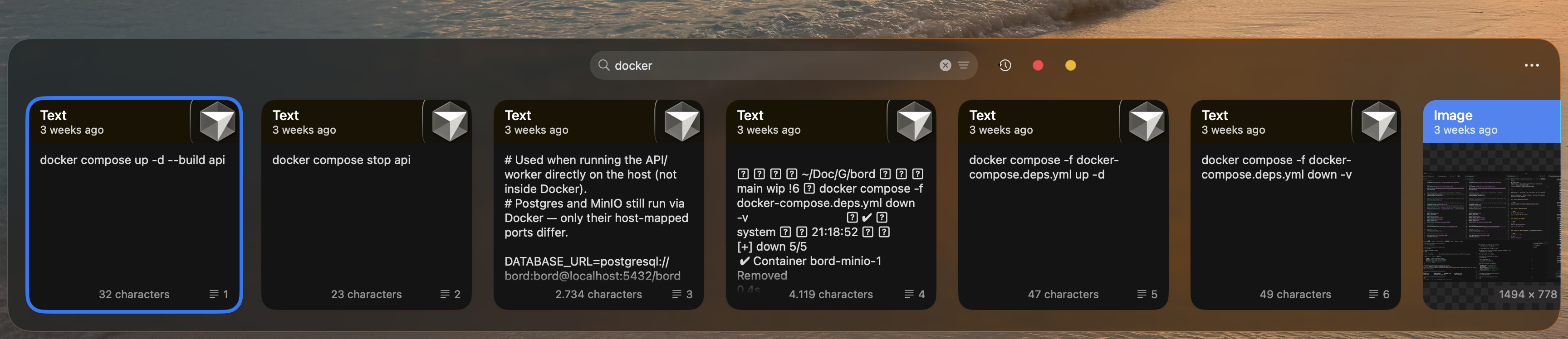
Paste has been a fixture of the Mac clipboard manager market since 2016. The app is built around a single strong design idea: your clipboard history should look like a shelf of cards, not a text list. Press a keyboard shortcut and a panel slides up from the bottom of your screen showing a horizontal row of clipboard cards — text, images, links, colors — most recent on the left.
It's visually distinctive in a way that most clipboard apps aren't. Every item renders as a properly formatted card with a preview. Screenshots show as thumbnails, links show website favicons, text shows a formatted excerpt. The interface is clearly designed with care, and it feels native to macOS in a way that cheaper alternatives don't.
What Paste does well
The visual design
No other clipboard manager looks quite like Paste. The card-based horizontal layout is immediately understandable, and the animations when the panel opens and closes are polished. If design quality is a priority for the apps you use, Paste is the clear winner in this category.
Pinboards
Pinboards are permanent named collections where clips live outside the normal history churn. Create a board for email templates, one for client addresses, one for canned replies. Anything pinned there persists indefinitely. Tabs for each board appear at the top of the Paste panel.
This is Paste's most practical feature for certain workflows. If your work involves reusing the same handful of things across sessions — standard contract clauses, support reply templates, account numbers — Pinboards handle it cleanly. No need to search for them or recopy them.
Cross-device sync
Paste syncs clipboard history and Pinboards across Mac, iPhone, and iPad via private iCloud. Copy something on your phone during a commute and it's on your Mac when you sit down. For people who genuinely move content between Apple devices, this is real and useful — and it's something almost no other clipboard manager offers.
Where Paste frustrates
Finding older items
The horizontal carousel is the biggest practical problem with Paste. It works beautifully for the last dozen items — things from the past hour or two. Scroll right and you recieve an increasingly long list with no way to jump to a specific date, filter by which app something came from, or narrow by content type.
Anything you copied more than a few hours ago requires scrolling. There is no date filter, no per-app filter, no way to say "show me only what I copied from Figma." If you don't remember roughly when you copied something, the only option is scrolling and visual scanning — or a direct text search if the item was text.
No OCR image search
Paste shows image thumbnails. You cannot search what's inside them. Copy a screenshot of an error message and it becomes a thumbnail you have to visually identify. If you copy a lot of screenshots, finding a specific one from last Thursday means scrolling through thumbnails and hoping you remember what it looked like.
This isn't a feature gap in the abstract — it's the most common retrieval problem developers and designers actually hit. Pastery solves it with Apple Vision OCR — read our guide on searching inside screenshots on Mac.
No text transforms
Paste pastes items exactly as copied. There's no way to format JSON, decode a URL-encoded string, or change case before pasting. Small friction, but it's daily friction for developers.
Pricing
Paste costs approximately $29.99 per year, with monthly and lifetime options available. The free tier limits history to 100 items, which is not a real trial. For Mac-only users, you're paying partly for iPhone and iPad support you may never use.
How Pastery compares
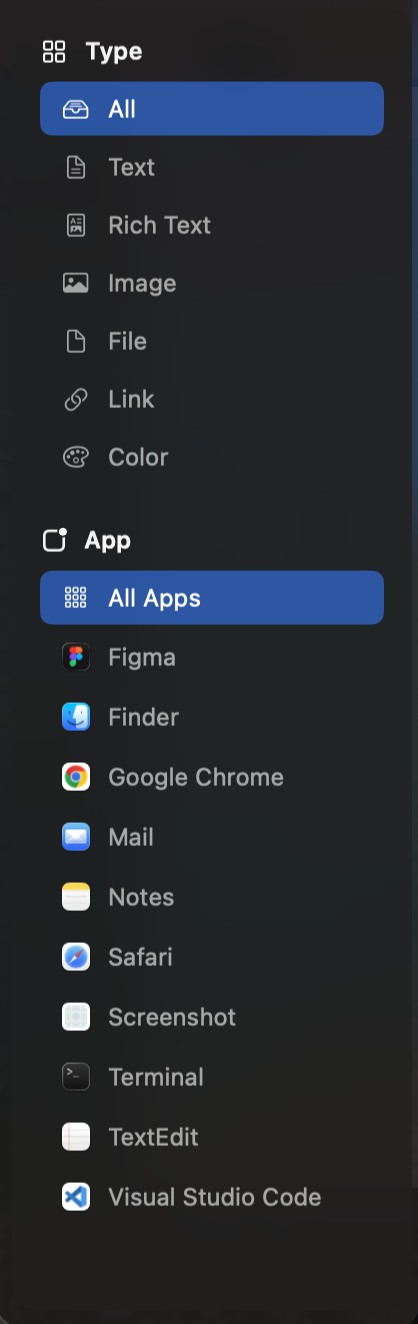
Pastery takes the same premise — visual clipboard history — and makes retrieval the priority rather than the interface. Overview Mode is a full-window grid with a sidebar that filters by content type, source app, and date range. It also runs Apple Vision OCR on every screenshot you copy, making image content searchable by what's in it.
The trade-off: Pastery is Mac-only and has no cross-device sync. If you genuinely copy things between iPhone and Mac and need them available instantly on both, Paste wins that specific use case. Pinboards are no longer a difference — Pastery added its own in 1.3.2, covered in how to save clipboard items permanently on Mac.
For Mac-only users — which is the majority of people looking at clipboard managers for their computer — the lack of sync is not a real loss, and the retrieval gap between Paste and Pastery is substantial. See our Pastery vs. Paste comparison for a side-by-side breakdown.
Who should use Paste
- You actively move content between Mac, iPhone, and iPad and need it immediately on all devices
- You want a permanently free tier and a 100-item history is enough
- Most of what you need to retrieve is from the last hour or two
Who should look elsewhere
- You're Mac-only and don't need cross-device sync — you're paying for features you won't use
- You copy screenshots regularly and need to find specific ones by content
- You need to retrieve items from days ago without scrolling
- You want text transforms before pasting
Frequently asked questions
Is Paste app worth it?
For multi-device Apple users who need iCloud clipboard sync — yes. For Mac-only users who need deep retrieval or image search, Pastery covers significantly more ground at a similar price point.
How much does Paste app cost?
Around $29.99 per year, with monthly and lifetime options. The free tier is limited to 100 items. Prices vary by region — check pasteapp.io for current figures.
Does Paste sync with iPhone?
Yes — clipboard history and Pinboards sync across Mac, iPhone, and iPad via private iCloud. This is Paste's main differentiator from most clipboard managers.
Can Paste search inside screenshots?
No. Paste shows image thumbnails but cannot search their contents. Pastery uses Apple Vision OCR to index the text inside every screenshot you copy, making them searchable.
What are Paste Pinboards?
Permanent named collections for clips that should never expire. Create boards for templates, client details, or recurring content. Clips pinned there survive regardless of new clipboard activity.
What is the best alternative to Paste?
Pastery for Mac-only users who need deep retrieval, OCR image search, and text transforms. Maccy for free, text-only clipboard history. Raycast clipboard if you already use Raycast and your needs are basic.