Comparison
Pastery vs. Paste: Two Visual Clipboard Managers for Mac Compared (2026)
Both apps show your clipboard visually. Paste is built for the last hour. Pastery is built for the last week.
Written by the Pastery team. We've tried to be fair — and where Paste is genuinely better, we say so.
Choose Paste
- You regularly move content between iPhone/iPad and Mac
- You want a permanently free tier — Paste keeps 100 items at no cost
Choose Pastery
- You need to find things you copied days ago
- You copy screenshots and want to search inside them
- You want text transforms before pasting
- Mac-only — no need for iPhone or iPad sync
Feature comparison
| Feature | Paste | Pastery |
|---|---|---|
| Annual price | $29.99/yr (~$2.49/mo) | $24.99/yr (~$2.08/mo) |
| Lifetime purchase | Yes — see pasteapp.io | $59.99 |
| Free trial | Free tier, 100-item limit | 7 days, full access, no card |
| Platform | macOS + iPhone + iPad | macOS only |
| Visual clipboard cards | Horizontal carousel | Overview Mode grid |
| Filter by app / date | — | Yes — sidebar filters |
| Image OCR search | — | Yes — Apple Vision |
| Text transforms before paste | — | Yes |
| Pinboards (saved clip collections) | Yes | Yes — since 1.3.2 |
| iPhone / iPad sync | Yes — private iCloud | — (Mac only) |
| Full-text search | Yes | Yes + image contents |
| Data stays on device | Private iCloud | Fully local |
Paste pricing is in USD and varies by region. Check pasteapp.io/pricing for current figures.
Paste: a visual clipboard for recent history
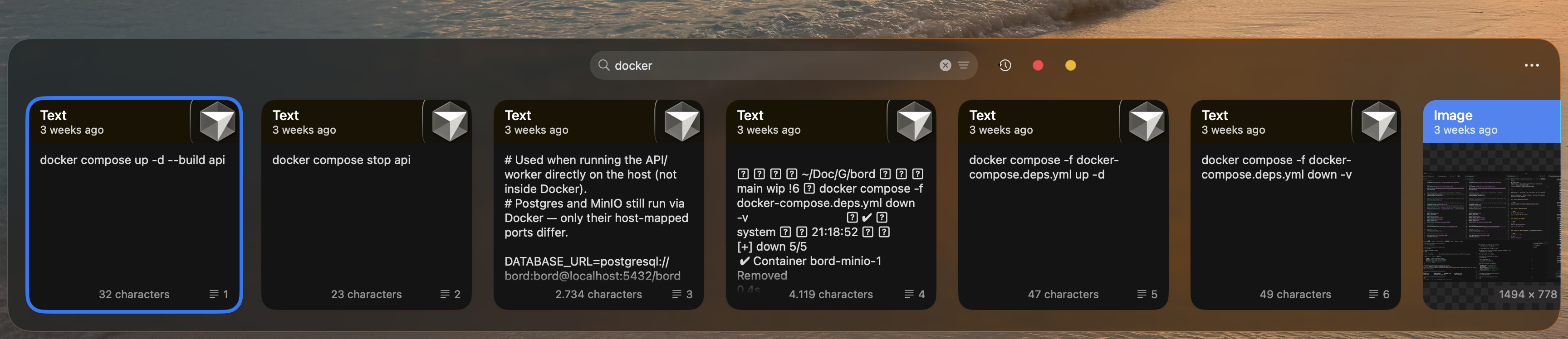
Paste has been around since 2016. You hit a keyboard shortcut, a panel slides up from the bottom of your screen, and you see a horizontal row of clipboard cards — text, images, links, colors. Recent items on the left, older ones to the right. For the last dozen items, this is fast and looks good.
Paste also offers Pinboards — named collections where clips live permanently outside of normal history. Pastery added its own pinboards in 1.3.2, so this is no longer a difference between the two; the difference is sync. Paste syncs history and boards across Mac, iPhone, and iPad via private iCloud, which means your clipboard data travels through Apple's infrastructure. For people who genuinely move content between devices, that's useful. It does mean your clipboard is no longer fully local.
Pastery: a clipboard you can actually search
Pastery starts from the same visual premise and goes in a different direction. Every clip is stored as a typed card: screenshots render as thumbnails, links pull rich previews, hex colors show as swatches, text shows a formatted excerpt. The moment you copy a screenshot, Apple Vision OCR runs in the background and indexes every piece of visible text.
There's also a text transform toolbar: hover over any text clip before pasting and you can convert case, trim whitespace, format JSON, decode a URL, and about a dozen other operations. The transformed version is pasted; the original stays in history unchanged.
Overview Mode vs. the horizontal carousel
This is the difference that matters most in practice, and it's easy to miss from screenshots alone.
Paste's history is a horizontal scroll. Newest clip far left, oldest far right. For the last dozen items — things from the past few minutes — this is fast. For anything from this morning, you're scrolling. For something from yesterday, you're scrolling considerably further. There are no date filters, no app filters, no way to jump to a specific timeframe. Once your history is deep, older items are effectively out of reach without a direct-text search.
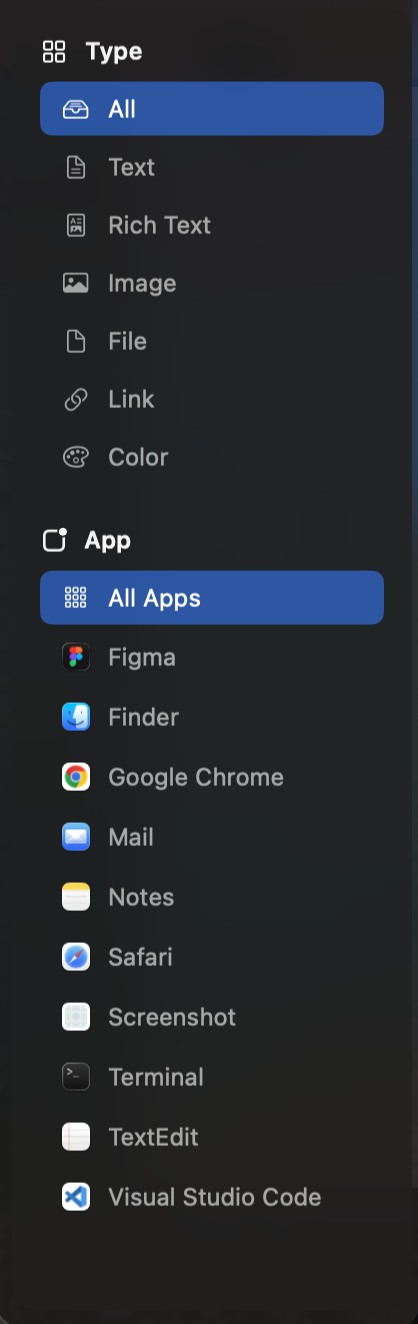
Pastery's Overview Mode is a full-window grid. Every clipboard item laid out chronologically, with a sidebar that filters by content type (image, text, link, color, file), source application, and date range. The search bar runs across the entire filtered set — including text visible inside images. Finding something you copied four days ago from Figma takes about five seconds.
/assets/articleassets/paste-vs-pastery-overview-comparison.pngPinning partially solves this in either app: mark something before it drifts away. But pinning requires anticipating what you'll want later. Overview Mode assumes you won't — and that a fast filter beats relying on a habit.
Image OCR search
Copy a screenshot in Pastery and Apple Vision reads every piece of text in it — immediately, in the background. Days later, you can type "404 error" or "border-radius" or "TypeError undefined" and find the screenshot where those words appeared. No scrolling, no visual browsing. Read our full guide on searching inside screenshots on Mac.
Paste shows thumbnails. You can scroll through them visually. But you cannot search their contents. For anyone who copies a lot of error screenshots, design references, or documentation grabs, OCR search changes what your clipboard is actually useful for.
Text transforms
Hover over any text clip in Pastery and a toolbar appears: uppercase, lowercase, title case, trim whitespace, format JSON, minify JSON, decode URL encoding, strip HTML. Click one; Pastery pastes the modified version. The original clip stays unchanged in history.
If you regularly copy API responses, URL-encoded strings, or content that needs case adjustment before you can use it — this replaces a trip to a browser tab or terminal every single time. Paste has nothing like it. See how to format JSON before pasting on Mac for a common example.
Pinboards
Pinboards are permanent named collections — a board for email templates, one for design tokens, one for client numbers. Clips pinned there never expire. It turns a clipboard into a small snippet library on top of the rolling history. Paste has had this for years; Pastery added it in 1.3.2, so both apps cover it now.
The implementations differ in where the boards live. Paste puts them in tabs across the top of its panel. Pastery puts them as colored chips next to the search field, in both the quick list and the full history view, and pinning is ⌘P on the selected clip. Pinned clips are excluded from the retention sweep, so they persist regardless of age.
Worth being honest about the limits of boards in general: they only help with clips you thought to pin. Most of what you go looking for is something you copied without knowing you'd need it again — which is why retrieval (search, filters, OCR) matters more day to day than organization does. We wrote up the whole approach in how to save clipboard items permanently on Mac.
Pricing
| Plan | Paste | Pastery |
|---|---|---|
| Monthly | Available — check pasteapp.io | $2.99 |
| Annual | $29.99/year (~$2.49/mo) | $24.99/year (~$2.08/mo) |
| Lifetime | Available — check pasteapp.io | $59.99 |
| Free tier | 100-item history, always free | 7-day full trial, no card |
| Devices | Mac + iPhone + iPad | Mac only |
Annual rates are roughly similar in real terms. Paste's higher nominal price reflects its iPhone and iPad support — if you're Mac-only, you're paying for platforms you don't use. Pastery's $59.99 lifetime option is fixed and transparent; Paste's lifetime price varies by region.
The bottom line
Paste is fine for keeping tabs on very recent copies, plus whatever you curated onto a board. For anything older than a few hours that you didn't think to pin, the horizontal carousel becomes a wall you scroll through hoping you'll recognize it.
Pastery is built around the assumption that you won't always remember to organize, but you will need to find something later. Overview Mode, OCR search, and app filters make retrieval fast without requiring any upfront discipline. For Mac-only users, see also our Pastery vs. Maccy and Paste app review.
The 7-day trial has no credit card requirement. If you're currently on Paste, it's a direct comparison you can make yourself.
Frequently asked questions
Is Pastery better than Paste?
For Mac-only workflows — yes, clearly. Pastery has OCR image search, Overview Mode, app and date filters, and text transforms, and it matches Paste on pinboards since 1.3.2. Paste has none of those first four. The scenarios where Paste still has an edge: you copy between iPhone/iPad and Mac, or you want a permanently free tier.
Does Paste sync with iPhone?
Yes. Paste syncs clipboard history and Pinboards across Mac, iPhone, and iPad via private iCloud. Pastery is Mac-only and stores everything locally with no cloud component — its pinboards live on your Mac and never leave it.
How much does Paste app cost?
$29.99 per year (about $2.49/month billed annually). Monthly and lifetime options are also available — prices vary by region. See pasteapp.io/pricing for current numbers.
Does Paste have a lifetime license?
Yes. Both Paste and Pastery offer lifetime purchase options. Pastery's lifetime license is $59.99. Paste's lifetime price varies by region — check their pricing page.
What is Overview Mode in Pastery?
Overview Mode is Pastery's full-window clipboard browser — a visual grid of your entire history with sidebar filters for content type, source app, and date range. The search bar covers text and image contents simultaneously. It makes finding something from days ago take seconds, where Paste's horizontal carousel becomes impractical for anything older than a few hours.
Can Paste search inside images?
No. Paste shows thumbnails but can't index image contents. Pastery uses Apple Vision OCR on every screenshot you copy, making clipboard history searchable by text visible inside images.